
Technology That Can Support Memory & Thinking
Technology can be really helpful when memory or thinking becomes harder — but only when it makes life simpler.
The aim is not to fill the house with gadgets or introduce complicated new systems. A better place to start is with one question:
“What is becoming difficult, and could technology make that easier?”
For example:
- forgetting appointments
- losing keys
- struggling to read a phone screen
- forgetting something is cooking
- finding phone calls difficult to hear
- losing track of the dayfinding a smartphone too complicated
Technology can sometimes take some of the work away from memory, attention, planning, communication or vision and hearing. But the simplest option is often the best one.
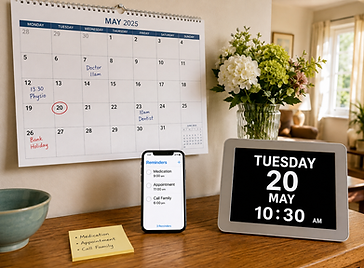
A paper calendar may work better than an app. A voice reminder may be easier than navigating a phone. Making the text larger may help more than buying a new device. If you are supporting someone else, involve them in the choice.
Rather than saying:
“You need this.”
try:
“Would this make that a bit easier for you?”
The aim is to help the person continue doing things for themselves — not to introduce technology they do not want or cannot comfortably use.
Explore Technology That May Help
Smartphones & Tablets
Before buying anything new, look at the phone or tablet the person already uses.
Many devices have built-in accessibility settings that can make them much easier to manage.
Useful options can include:
-
larger text
-
bold text
-
screen magnification
-
fewer notifications
-
commonly used apps kept on the first screen
-
important contacts saved as favourites
-
photographs added to contacts
-
text read aloud
-
voice control
-
speech-to-text
-
calendar reminders
-
alarms and timers
This may help with:
-
Vision
-
Attention
-
Communication
-
Memory
-
Planning
-
Processing information
Imagine this
If someone has stopped replying to messages because the writing is too small, they may not need a new phone.
Making the text bigger or having the phone read information aloud may be enough.
Sometimes changing the settings is more useful than changing the device.




Before Introducing New Technology
Technology should make everyday life easier — not create another problem to manage.
Before buying or setting anything up, ask:
-
What problem are we trying to solve?
-
Does the person actually want this?
-
Can they use it comfortably?
-
Would something simpler work just as well?
-
Who will help if it stops working?
A device that involves complicated passwords, updates, charging, menus or troubleshooting may create more work than it saves.
This is especially important if someone is living with dementia or is finding it harder to learn new information.
A completely new device or system may be difficult to learn and remember. Where possible, it can be better to:
-
adapt technology the person already knows
-
change one thing at a time
-
keep controls and instructions simple
-
practise together without rushing
-
avoid unnecessary apps or complicated settings
-
keep the layout familiar and consistent
For example, making the text larger on a familiar phone may be much easier than replacing it with a completely new device.
Everyone is different. Some people living with dementia may still be able to learn and use new technology, particularly when it is introduced gradually and has a clear purpose. The important question is whether it is helping that person in everyday life.
Start small. Try one change and see whether it genuinely makes things easier.
Privacy and Choice Matter
Some technology can collect or share information about someone's:
-
location
-
activity
-
health
-
routines
-
home
If you are supporting someone else, involve them in decisions about what is used and what information is shared wherever possible.
Technology designed to support safety should still respect the person's privacy, dignity and choice.
The Main Message
Start with the problem, not the product.
Forget appointments? Try a reminder.
Lose your keys? Try one consistent place, or consider an item tracker.
Can't read your phone easily? Make the text bigger or have information read aloud.
Forget something is cooking? Use a timer.
Struggle to hear phone calls? Explore captions or speech-to-text.
Phone becoming too complicated? Simplify it before replacing it.
You do not need every device or feature.
Sometimes one small change, used well, can make everyday life easier and help someone continue doing more for themselves.
Not sure what might help? An occupational therapist can look at the everyday activity that is becoming difficult and help explore technology, environmental changes or other practical solutions that fit the person's needs, abilities, routines and preferences.


